How a Clipboard Manager Saves Developers 30 Minutes a Day
A walk through a real developer's day — JWT decoding, ObjectID timestamps, JSON formatting, OCR — showing how a content-aware clipboard manager saves 30+ minutes and dozens of context switches.
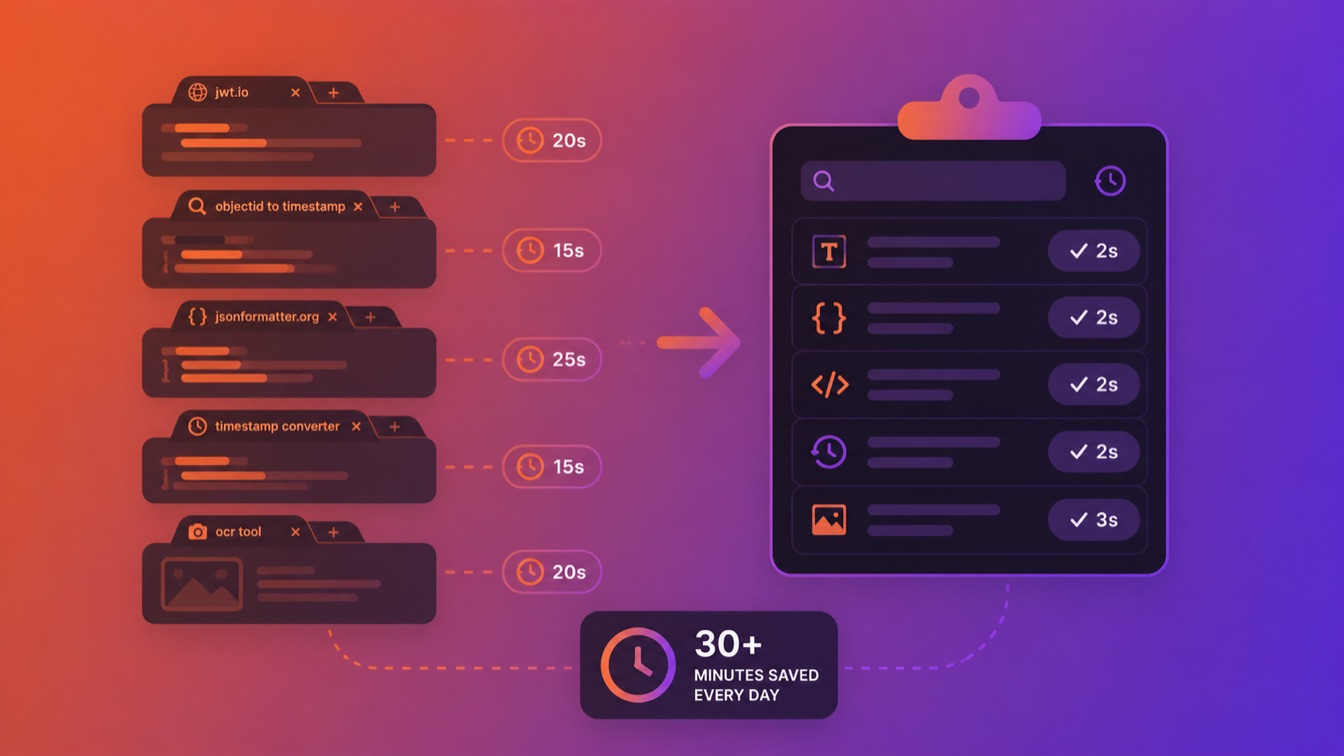
The biggest time sinks in a developer's day aren't the hard problems. They're the small interruptions you barely notice: opening a tab to decode a JWT, googling a timestamp converter, pasting JSON into a formatter, looking up what a cron expression means.
Each one takes 15–30 seconds. None of them feel significant. But across a full workday, they compound into something that matters — not just in lost minutes, but in broken focus.
Here's what a typical day looks like for a backend developer, and where a clipboard manager that understands developer content changes the math.
9:15 AM — Morning Code Review
You're reviewing a pull request. A colleague has added a new API endpoint that returns a JWT in the response body. You want to check what claims are in the payload.
Without ClipBear: Copy the JWT from the PR diff. Open jwt.io. Paste. Scroll to the decoded payload. Read it. Switch back to the PR. Repeat for the second endpoint. (~45 seconds per token, 2 tokens = ~90 seconds)
With ClipBear: Copy the JWT. Press Cmd+B. The JWT badge appears on the clipboard entry. Click the actions menu, "Copy Decoded Payload." Paste the formatted JSON right into your review comment. (~10 seconds per token, 2 tokens = ~20 seconds)
Time saved: ~70 seconds
10:00 AM — Debugging a Database Issue
A user reports seeing stale data. You query the database and get back several MongoDB documents. You need to check when specific documents were created, but the collection doesn't have a createdAt field — the timestamp is embedded in the ObjectID.
Without ClipBear: Copy each ObjectID. Search "mongodb objectid to timestamp." Paste into an online converter. Note the date. Repeat for 5 documents. (~20 seconds each = ~100 seconds, plus the initial search)
With ClipBear: Copy each ObjectID. The creation timestamp appears inline immediately: Date: 2024-10-28 04:54:54 UTC. No extra step. For 5 documents, you just copy and glance. (~3 seconds each = ~15 seconds)
Time saved: ~90 seconds
11:30 AM — Setting Up a Cron Job
You're configuring a scheduled task and find an existing cron expression in the config: 15 2 1 * *. You need to confirm what it means before modifying it.
Without ClipBear: Open crontab.guru. Type or paste the expression. Read the description. (~15 seconds)
With ClipBear: Copy the expression. "At 02:15 on day-of-month 1" appears inline below the entry. (~2 seconds)
Time saved: ~13 seconds (small, but this happens multiple times when working with cron)
1:30 PM — API Integration Work
You're integrating with a third-party API. The response comes back as a single-line JSON blob. You need to read the structure, extract a few fields, and write your parsing code.
Without ClipBear: Copy the JSON. Open a JSON formatter (browser bookmark or VS Code extension). Paste. Format. Read the structure. Copy specific nested values. (~25 seconds for the formatting round-trip, repeated 3–4 times as you explore different endpoints)
With ClipBear: Copy the JSON. Actions menu offers formatting with 2-space indentation and key quoting options. One click, and the formatted JSON is on your clipboard. (~5 seconds, repeated 3–4 times)
Time saved: ~80 seconds across the session
2:45 PM — Infrastructure Work
You're updating firewall rules. You have a list of IP addresses from your logs and need to add them as CIDR ranges to an allowlist.
Without ClipBear: For each IP, manually append /24 or look up the correct notation. Or open a subnet calculator. (~10 seconds each for 6 IPs = ~60 seconds)
With ClipBear: Copy each IP. One-click "Copy as CIDR /24" (or /64 for IPv6). Paste into your config. (~3 seconds each for 6 IPs = ~18 seconds)
Time saved: ~42 seconds
3:30 PM — Investigating an Auth Issue
A user can't log in. You grab their session token from the logs — it's a JWT. You need to check the expiration claim, the issuer, and the user ID.
Without ClipBear: Copy the token. Open jwt.io. Paste. Find the exp claim. Copy the Unix timestamp. Open a timestamp converter. Paste. Read the human date. (~40 seconds)
With ClipBear: Copy the token. Decode the payload in one click. The exp value is right there in the formatted JSON. Copy that Unix timestamp — ClipBear recognizes it and shows the date inline. (~10 seconds)
Time saved: ~30 seconds
4:15 PM — Frontend Color Work
A designer sends you updated brand colors as hex values in a Slack message. Your CSS uses HSL. You need to convert three colors.
Without ClipBear: For each color, open a hex-to-HSL converter. Paste. Copy the result. (~15 seconds each for 3 colors = ~45 seconds)
With ClipBear: Copy each hex value. ClipBear shows a color swatch and offers one-click conversion to RGB, RGBA, HSL, or HSLA. (~4 seconds each for 3 colors = ~12 seconds)
Time saved: ~33 seconds
5:00 PM — End of Day Documentation
You're writing up a bug report and need to include a screenshot of the error. The screenshot has the stack trace, but you need it as text for the ticket.
Without ClipBear: Open the screenshot in Preview. Try to select the text (often doesn't work). Open an OCR tool or manually type the error message. (~60 seconds for a medium-length stack trace)
With ClipBear: The screenshot was already captured in your clipboard history. ClipBear's on-device OCR (Apple Vision) has already extracted the text — it's shown beside the thumbnail. One click to copy it. (~5 seconds)
Time saved: ~55 seconds
The Daily Total
| Task | Without ClipBear | With ClipBear | Saved |
|---|---|---|---|
| JWT decoding (4 tokens) | ~3 min | ~40 sec | ~2 min 20 sec |
| MongoDB ObjectID lookups (5) | ~2 min | ~15 sec | ~1 min 45 sec |
| Cron expression parsing (3) | ~45 sec | ~6 sec | ~39 sec |
| JSON formatting (4 operations) | ~1 min 40 sec | ~20 sec | ~1 min 20 sec |
| IP to CIDR (6 addresses) | ~1 min | ~18 sec | ~42 sec |
| Color conversion (3 colors) | ~45 sec | ~12 sec | ~33 sec |
| OCR from screenshot (1) | ~1 min | ~5 sec | ~55 sec |
| Clipboard retrieval (misc, 20x) | ~5 min | ~2 min | ~3 min |
Conservative daily total: ~15 minutes of time saved. On a heavy debugging or integration day, it easily reaches 30 minutes.
But the real metric isn't minutes — it's context switches avoided. Every tab you don't open is a train of thought you don't break.
It's Not About the Tool — It's About the Flow
The developers who benefit most from ClipBear aren't the ones who care about saving 15 seconds on a JWT decode. They're the ones who've noticed that their day is full of tiny interruptions that pull them out of flow state — and they want fewer of them.
A clipboard manager that understands developer content doesn't just save time. It keeps you in your editor, in your terminal, in the problem you're solving.
Try ClipBear free for 14 days at clipbear.app.